本ページでは、Shopifyに接続するための設定(接続情報)について説明します。
転送に関する設定については、転送元 - Shopifyを参照ください。
Shopify側で必要な作業
TROCCOからShopifyのデータを取得するには、Shopify側でカスタムアプリを作成し、APIアクセストークンを取得する必要があります。
カスタムアプリの作成方法は以下の2種類があります。
| 作成方法 | 概要 | 推奨 |
|---|---|---|
| Dev Dashboard経由で作成 | Shopify Dev Dashboardからアプリを作成する方法 | ✓ |
| Shopify管理画面で作成 | Shopify管理画面から直接アプリを作成する方法(レガシー) | - |
2026年1月1日以降、Shopify管理画面から新規でカスタムアプリを作成できなくなります。
新規でカスタムアプリを作成する場合は、Dev Dashboard経由での作成を推奨します。
既存のカスタムアプリは引き続き利用できます。
詳しくはShopify Changelog - Legacy custom apps can't be created after January 1, 2026を参照ください。
Dev Dashboardでアプリを作成する
Dev Dashboardを使用してカスタムアプリを作成し、認証情報を取得する手順を説明します。
1. Dev Dashboardにアクセスする
Shopify Dev Dashboardにアクセスします。
2. アプリを作成する
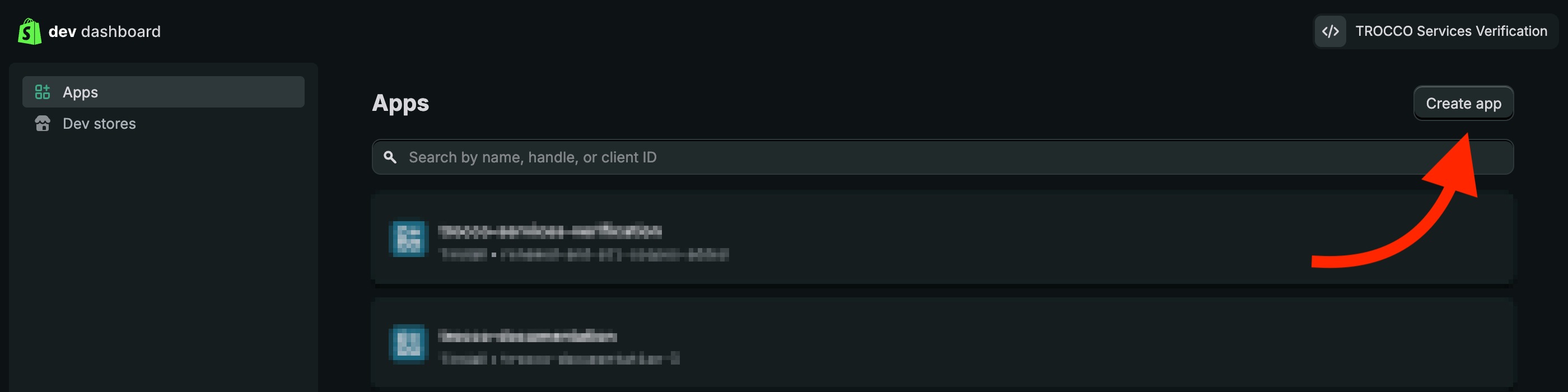
- 左パネルのAppsを選択し、Create appをクリックします。
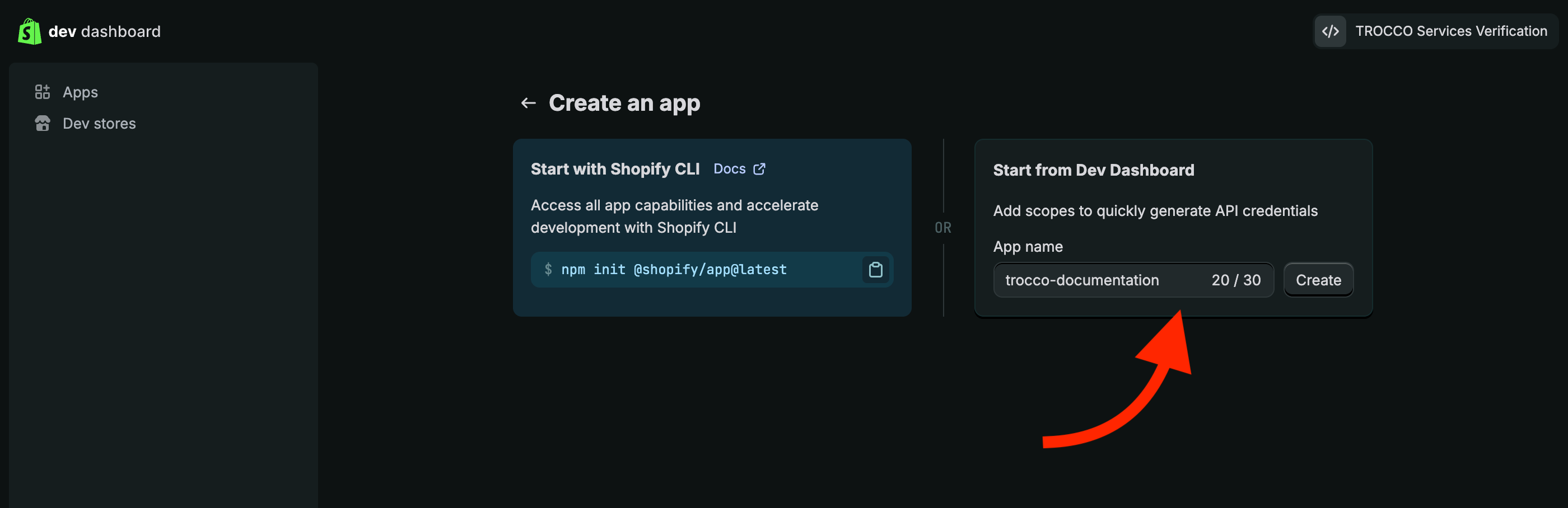
- Start from Dev Dashboard にアプリ名を入力し、Createをクリックします。
3. アプリの詳細を設定する
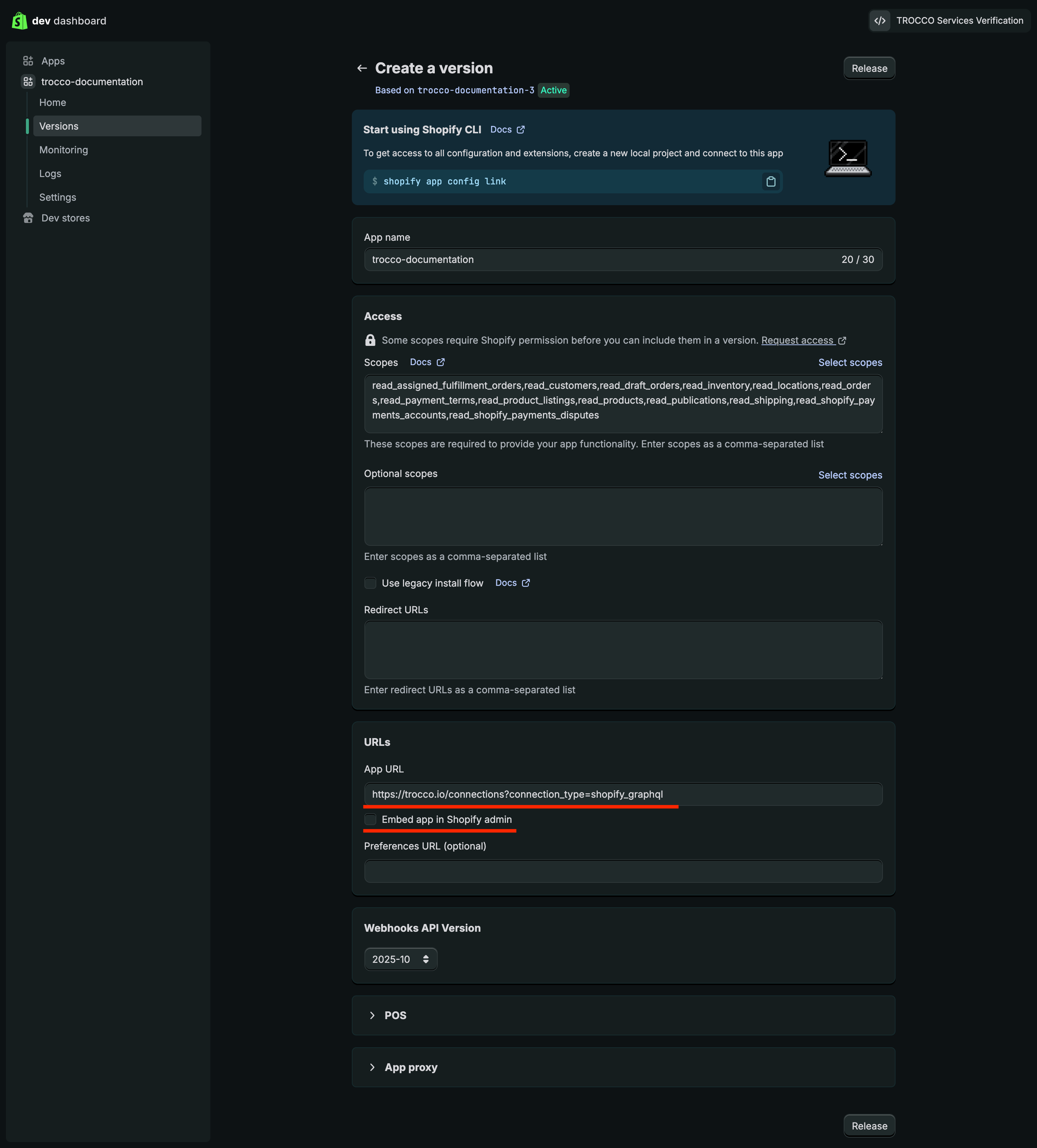
- 作成直後の画面のURLsセクション > App URLにTROCCOのShopify接続情報一覧ページのURL(
https://trocco.io/connections?connection_type=shopify_graphql) を設定し、Embed app in Shopify admin のチェックを外します。
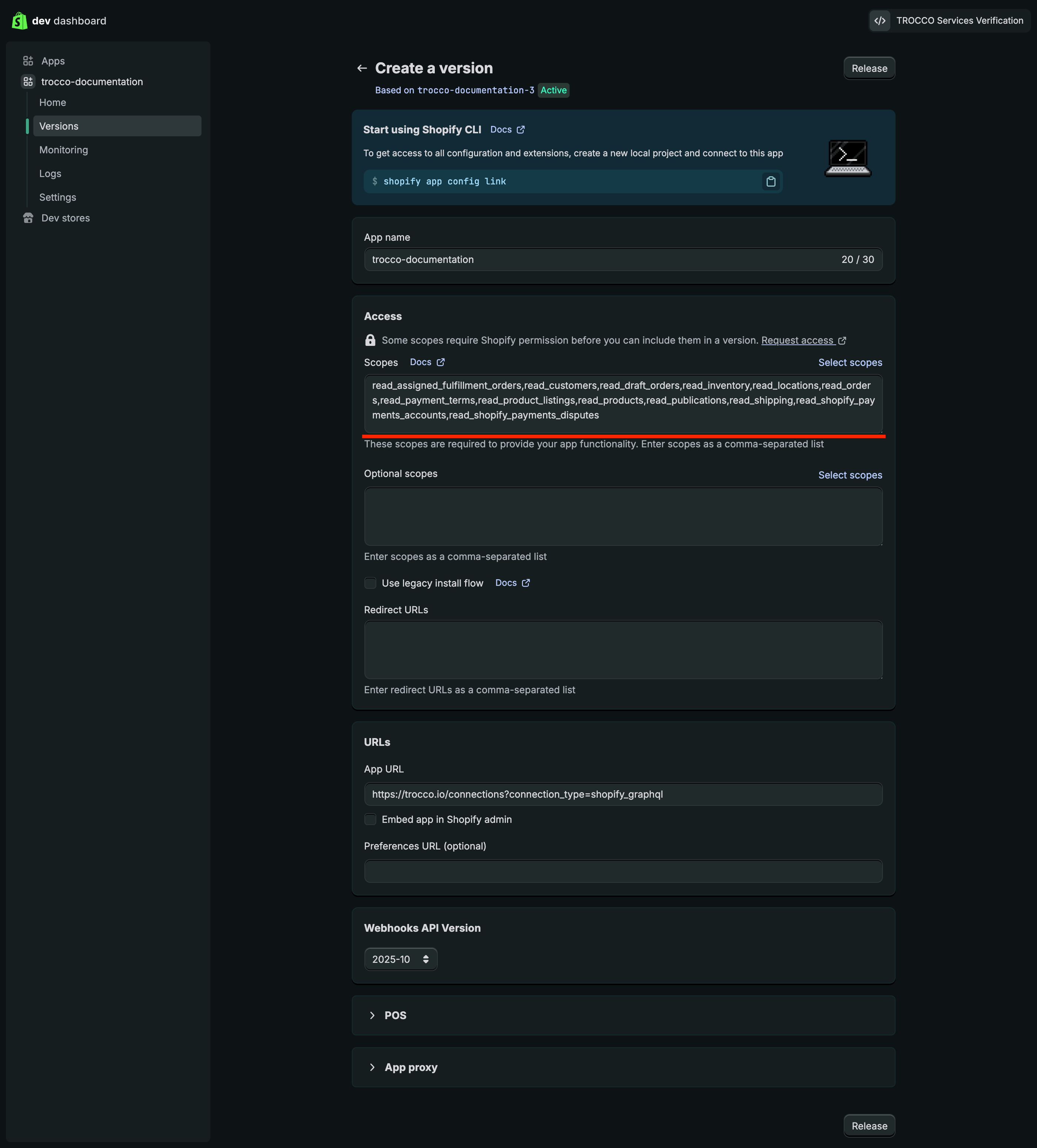
- Access セクションで、必要なAPIスコープを選択します。
ターゲットごとに必要となるスコープは、スコープの付与を参照ください。
- Release をクリックしてバージョンをリリースします。
Version nameおよびVersion messageは任意入力です。
4. 認証情報を取得する
- リリース後、左パネルのSettingsをクリックし、CredentialsセクションのClient IDとSecretをメモします。
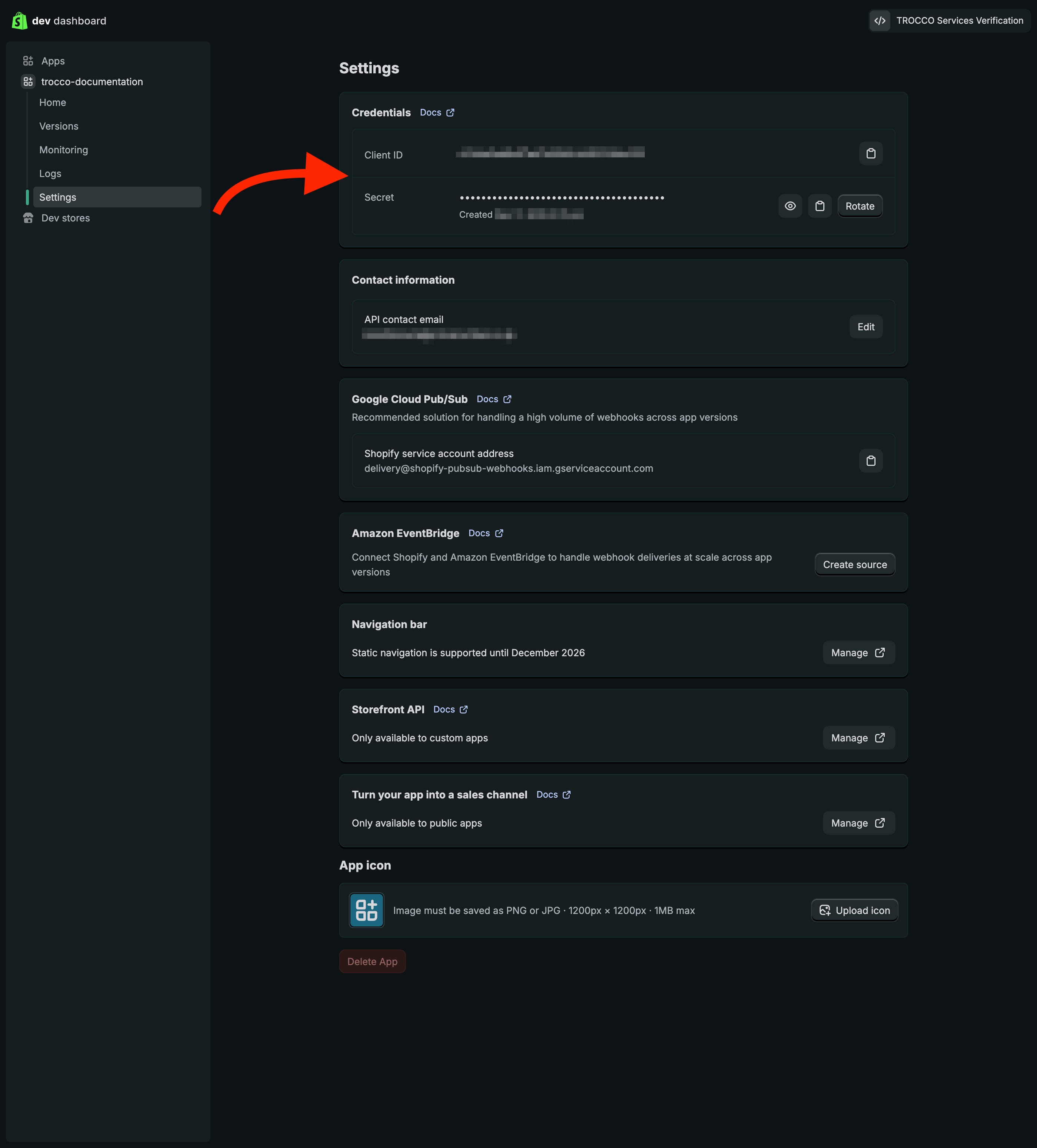
Client secretは機密情報です。安全な場所に保管し、第三者に公開しないでください。
Shopify Partnerでアプリの設定をする
Shopifyのアカウントやストアとは別にShopify Partner Program(無料)への登録が必要になります。
本来Shopifyのストア構築支援などで利用するプラットフォームですが、カスタムアプリのAPIアクセス設定のために必要となります。
1. 配布方法を選択する
Dev DashboardのSettingsにあるStorefront APIからリンクを開くと、Shopify Partner上のアプリ設定に遷移しますので、そちらで設定を続行します。
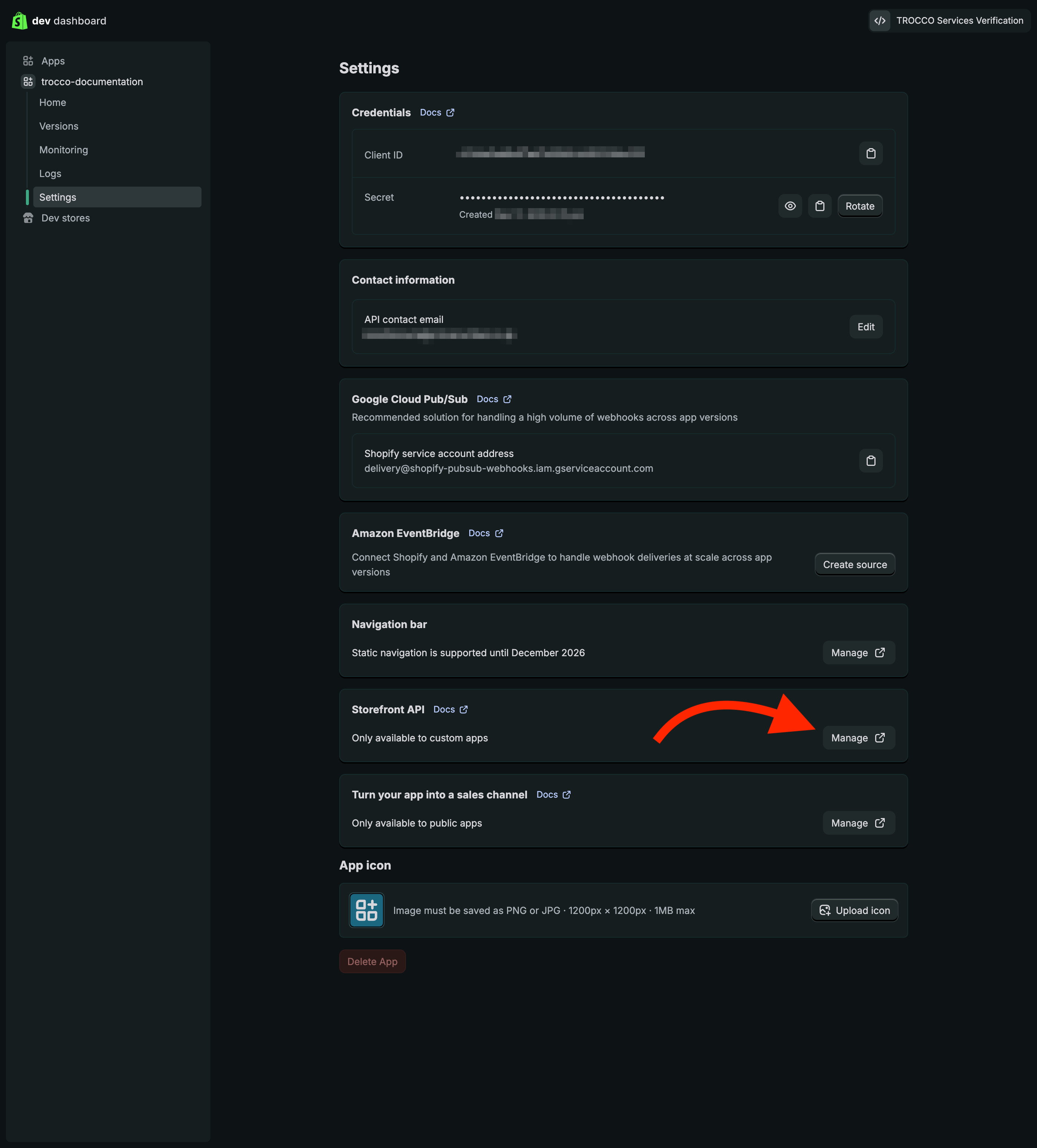
- 左パネルの配布からカスタム配布を選択し、選択をクリックします。
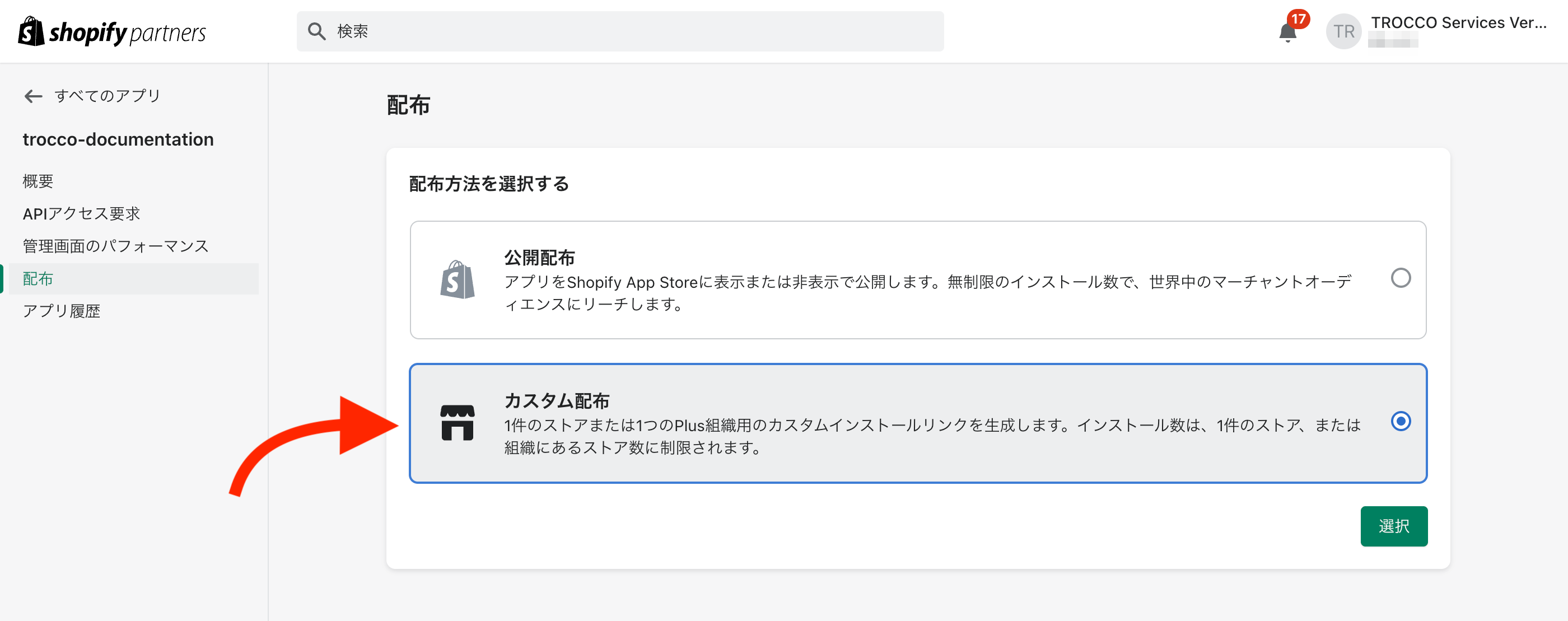
カスタム配布を選択することで、顧客情報へのアクセスが自動承認されます。
詳細はWork with protected customer data をご参照ください。
-
確認ダイアログが出てきますので、カスタム配布を選択をクリックします。
-
選択後のページにて、インストール先となるストアドメインを入力、必要に応じて1つのPlus組織に対して複数のストアのインストールにチェックを入れ、リンクを生成をクリックします。
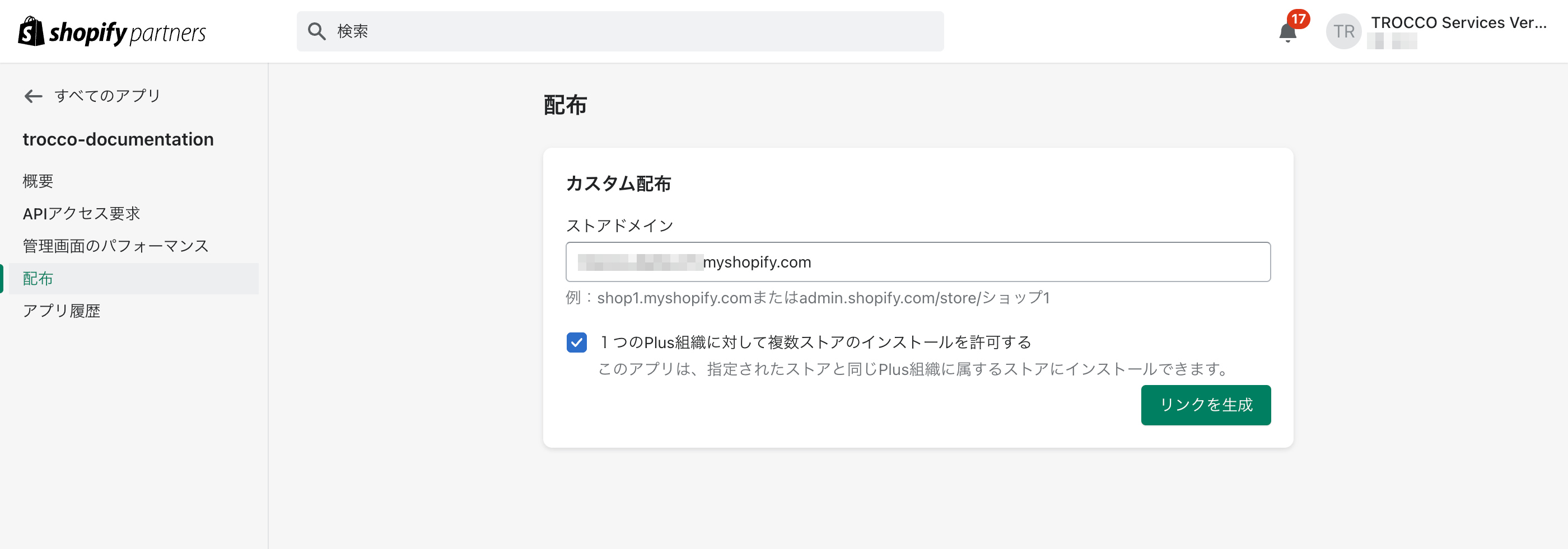
- 生成されたインストールリンクをメモします。
APIアクセスのリクエスト後、ストアにアプリをインストールする際にクリックして利用します。
2. APIアクセスをリクエストする
商品情報や60日以上前の注文データを取得するには、Shopify Partnerで追加のAPIアクセスをリクエストする必要があります。
| リクエスト項目 | 説明 | 対象となるターゲット |
|---|---|---|
| Storefront API | 商品情報を含むストアフロント向けのデータアクセス | products など商品情報を含むターゲット |
| すべての注文範囲を読み込む | 60日以上前の注文データへのアクセス権限 | orders、order_line_itemsなど注文関連のターゲット |
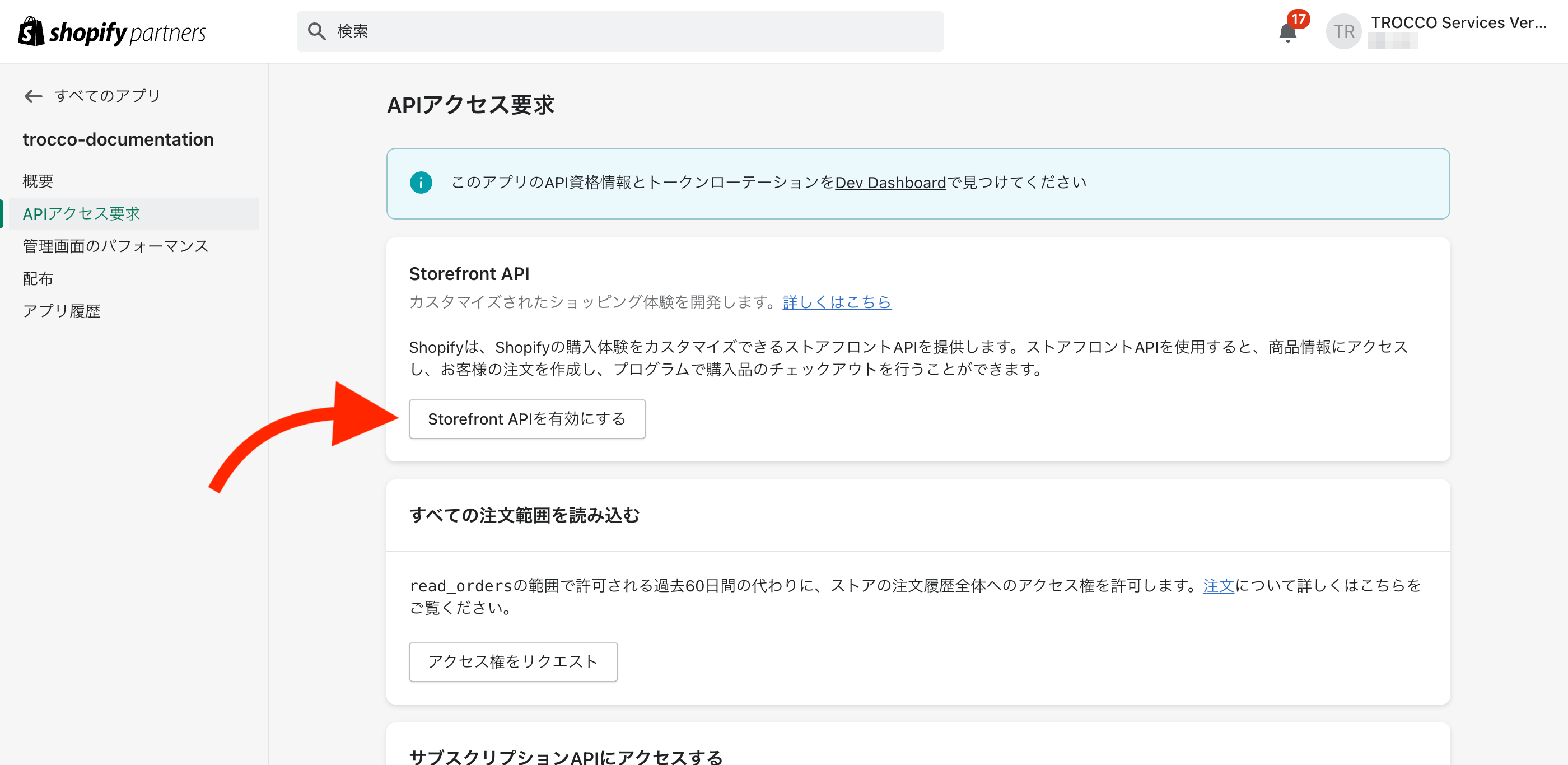
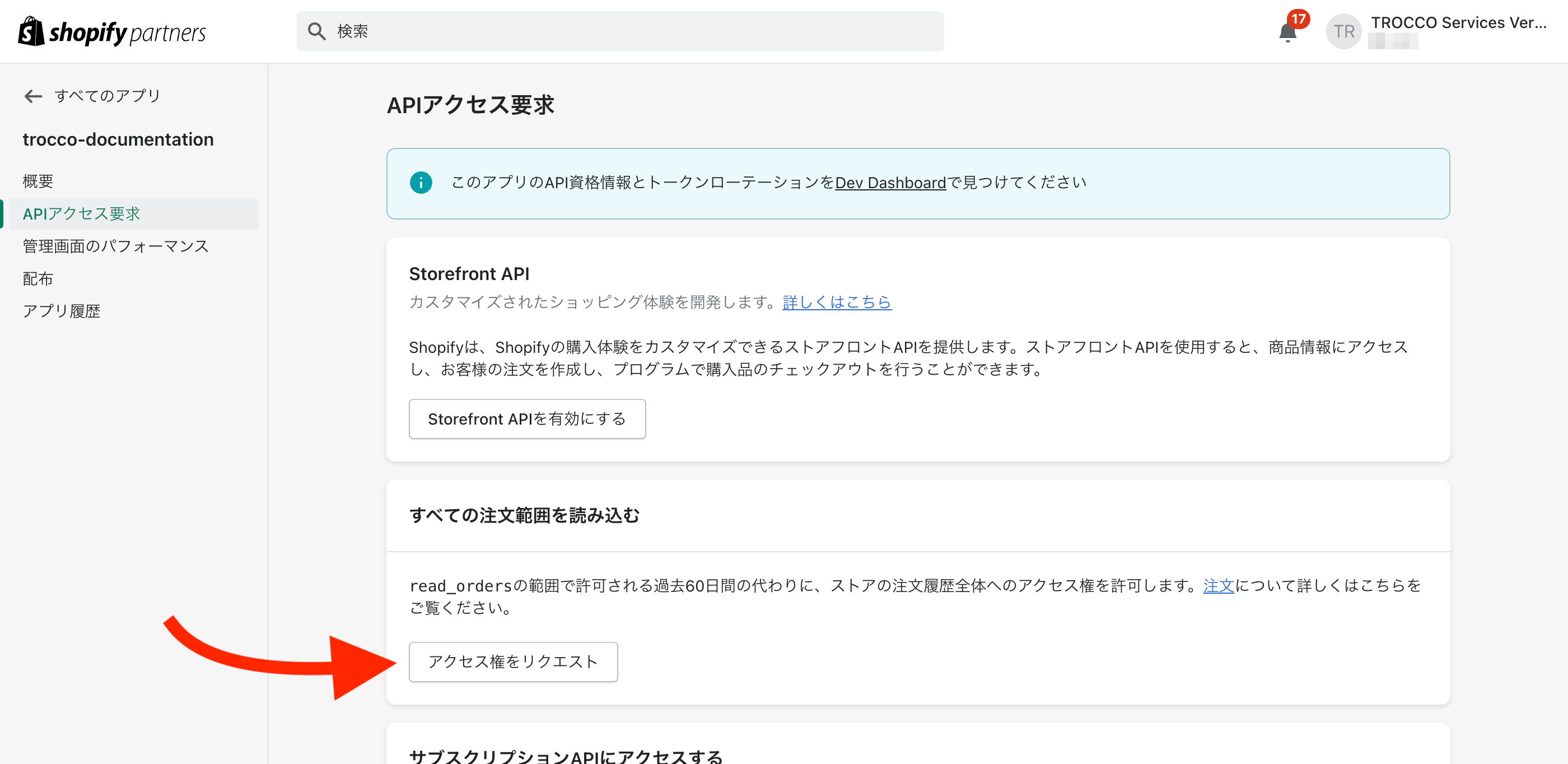
配布方法選択後、左パネルのAPIアクセス要求から設定します。
- Storefront APIを有効にする をクリックします。
- すべての注文範囲を読み込む セクションのアクセス権をリクエストをクリックします。
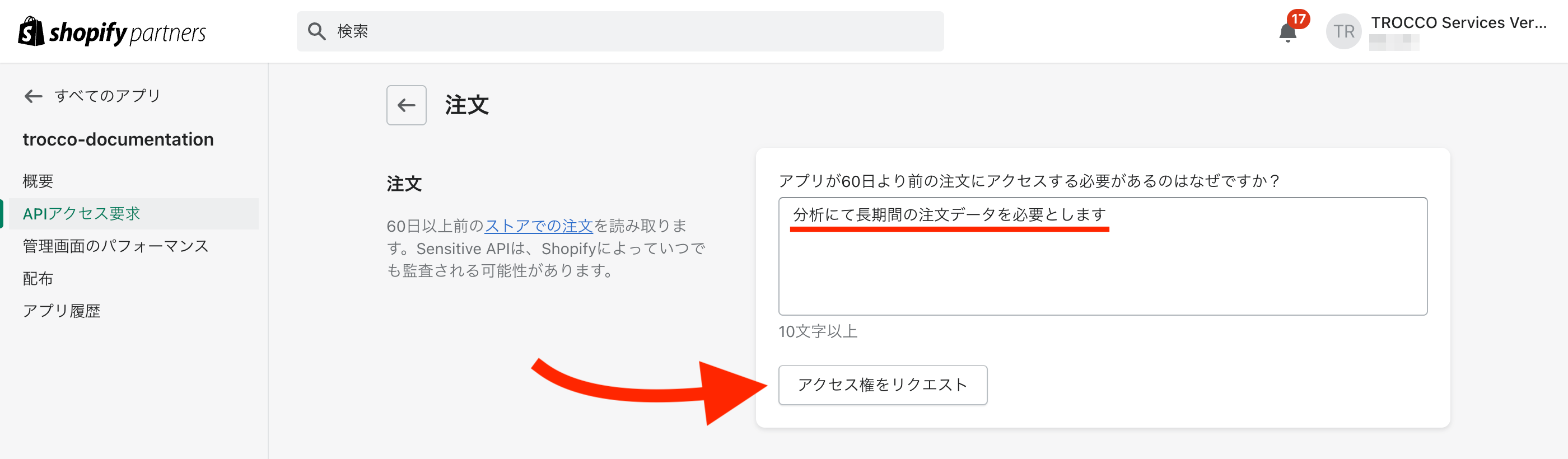
- アプリが60日より前の注文にアクセスする必要があるのはなぜですか? の項目に理由を入力し、アクセス権をリクエストをクリックします。
自動承認されますので、「分析にて長期間の注文データを必要とします」のような理由で十分です。
アプリをストアにインストールする
-
メモしたインストールリンクを開き、インストール対象のストアを選択します。
-
アプリ作成時に設定したTROCCOの接続情報ページが表示されたら完了です。
Shopify管理画面でカスタムアプリを作成する
本手順は2026年1月1日以降、新規アプリの作成に使用できなくなります。
新規でカスタムアプリを作成する場合は、Dev Dashboard経由でカスタムアプリを作成を推奨します。
Shopify管理画面を使用してカスタムアプリを作成し、アクセストークンを取得する手順を説明します。
-
Shopifyの管理画面にログインします。
-
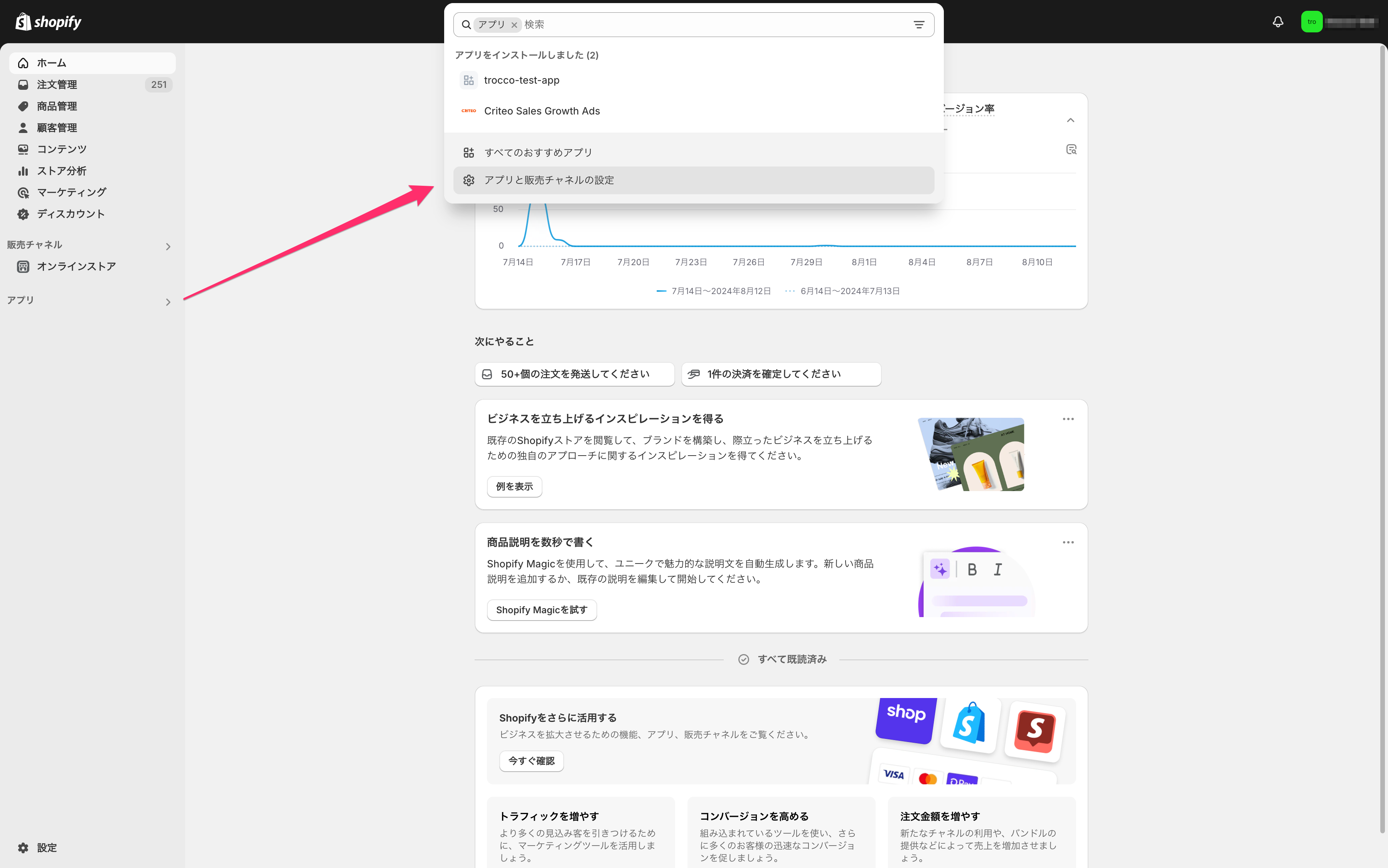
アプリ > アプリと販売チャネルの設定をクリックします。
-
アプリを開発をクリックします。
なお、本画面上にドメイン名が表示されているので、メモしてください。
ドメイン名は接続情報を作成する際に必要となります。
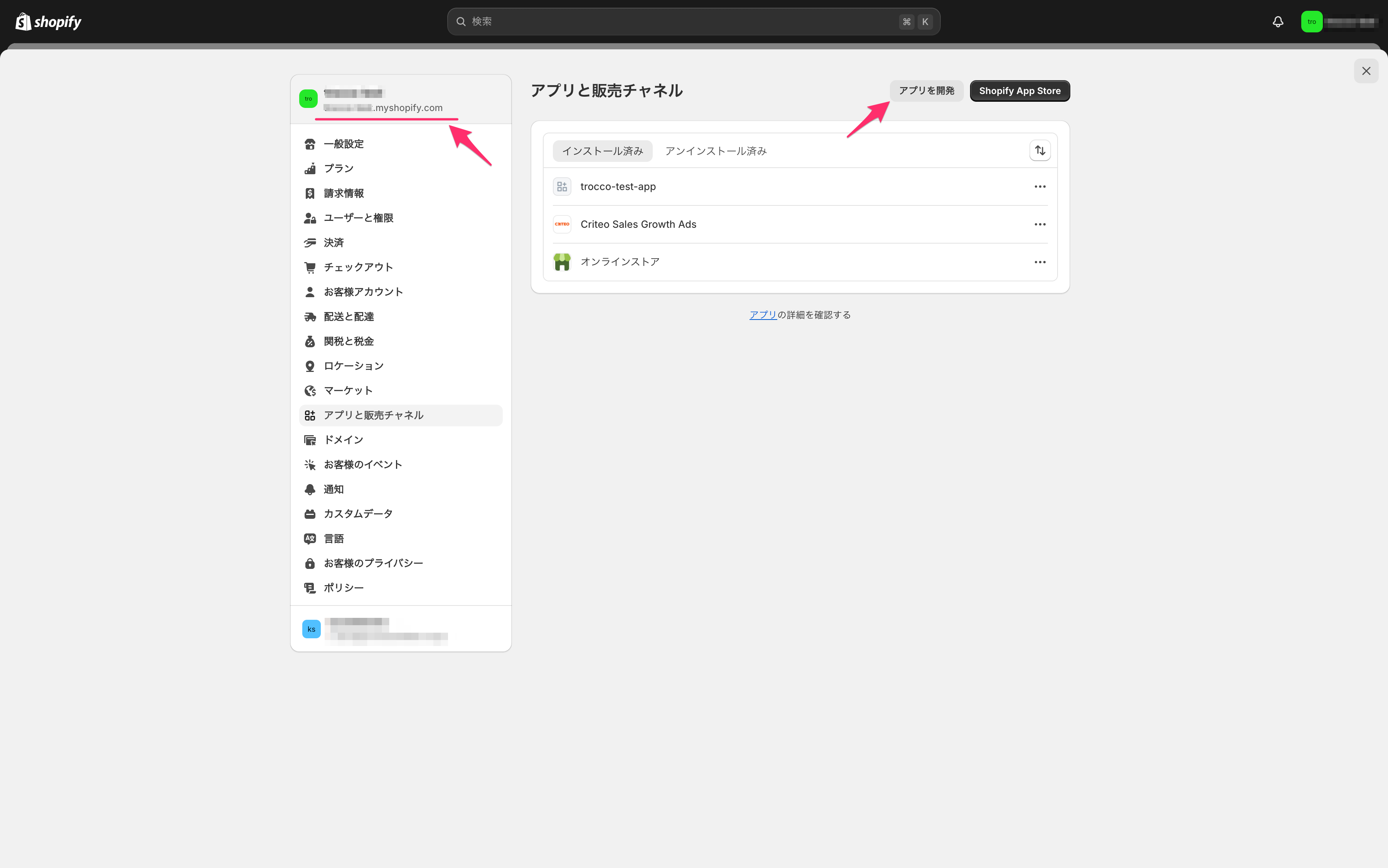
アプリを開発する権限を持っていない場合、ボタンが表示されません。
アプリ開発の権限を持っているユーザーアカウントを利用するか、Shopifyアカウントを管理するユーザーに権限の付与を依頼してください。
アプリ開発の権限について、詳しくはShopify公式ドキュメント - カスタムアプリのAPIスコープ権限を参照ください。
-
アプリを作成をクリックし、アプリを作成します。
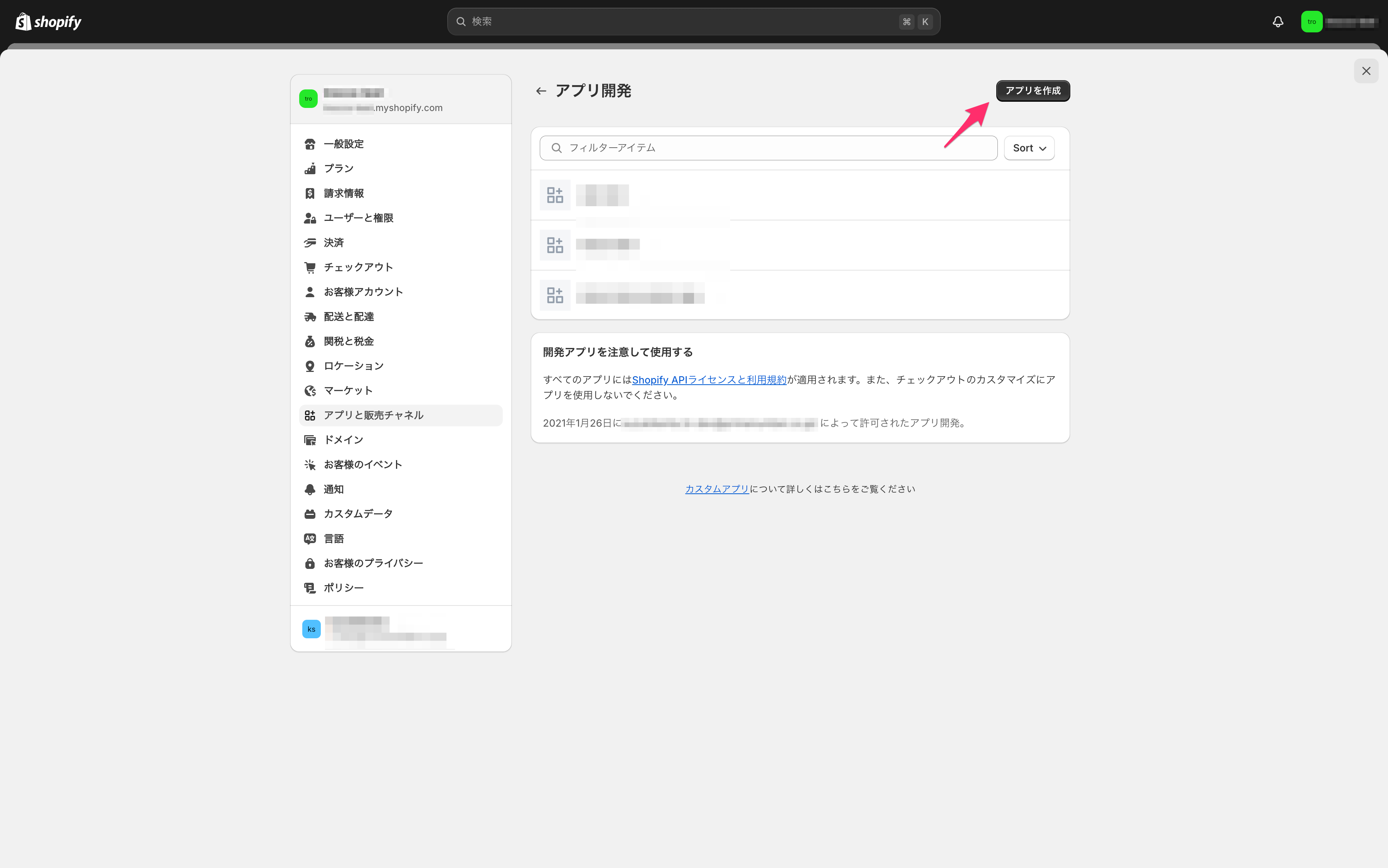
-
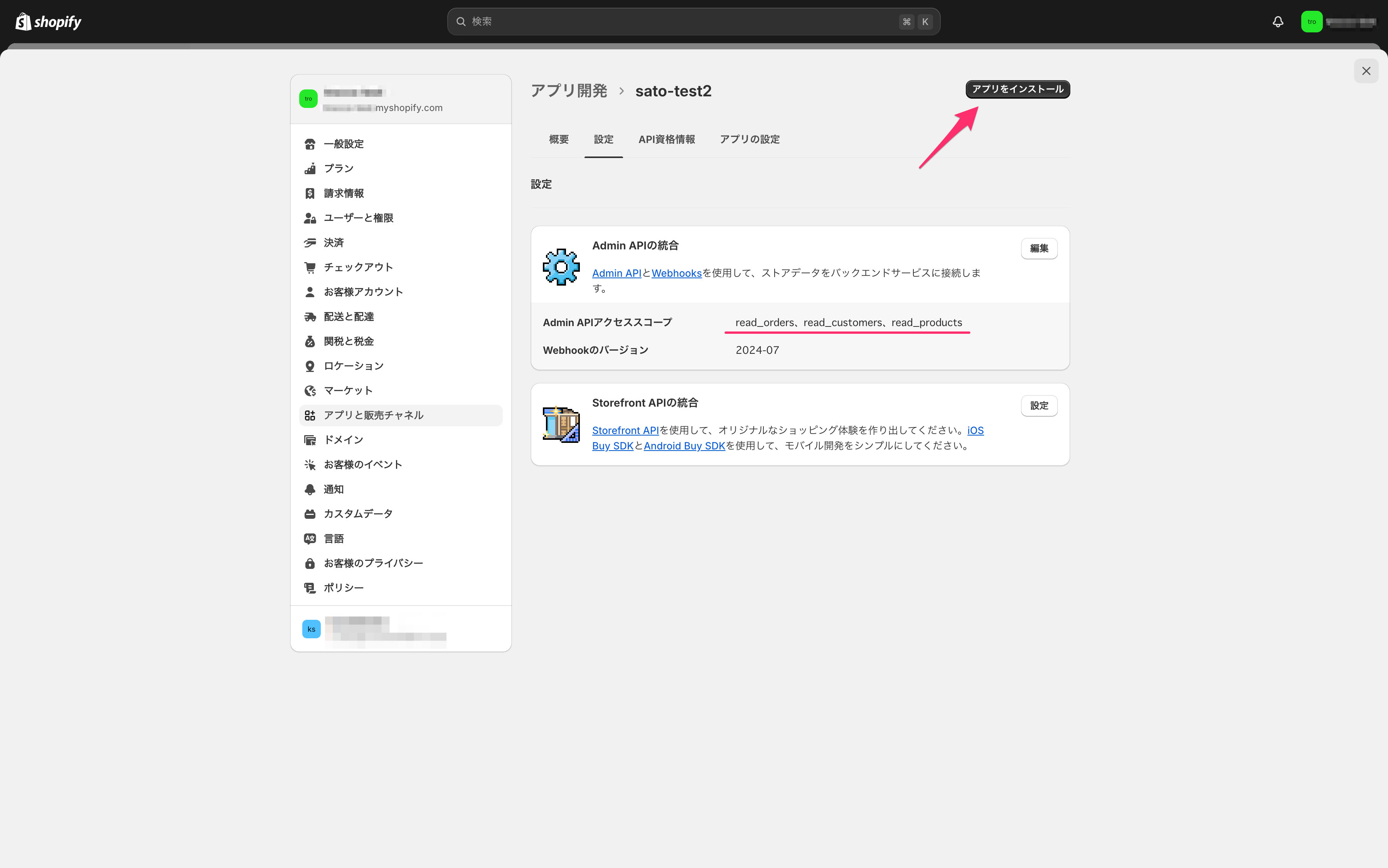
Admin APIスコープを設定するをクリックし、必要となるスコープを追加して保存します。
ターゲットごとに必要となるスコープは異なります。詳しくは、スコープの付与を参照ください。 -
アプリをインストールをクリックし、アプリをインストールします。
-
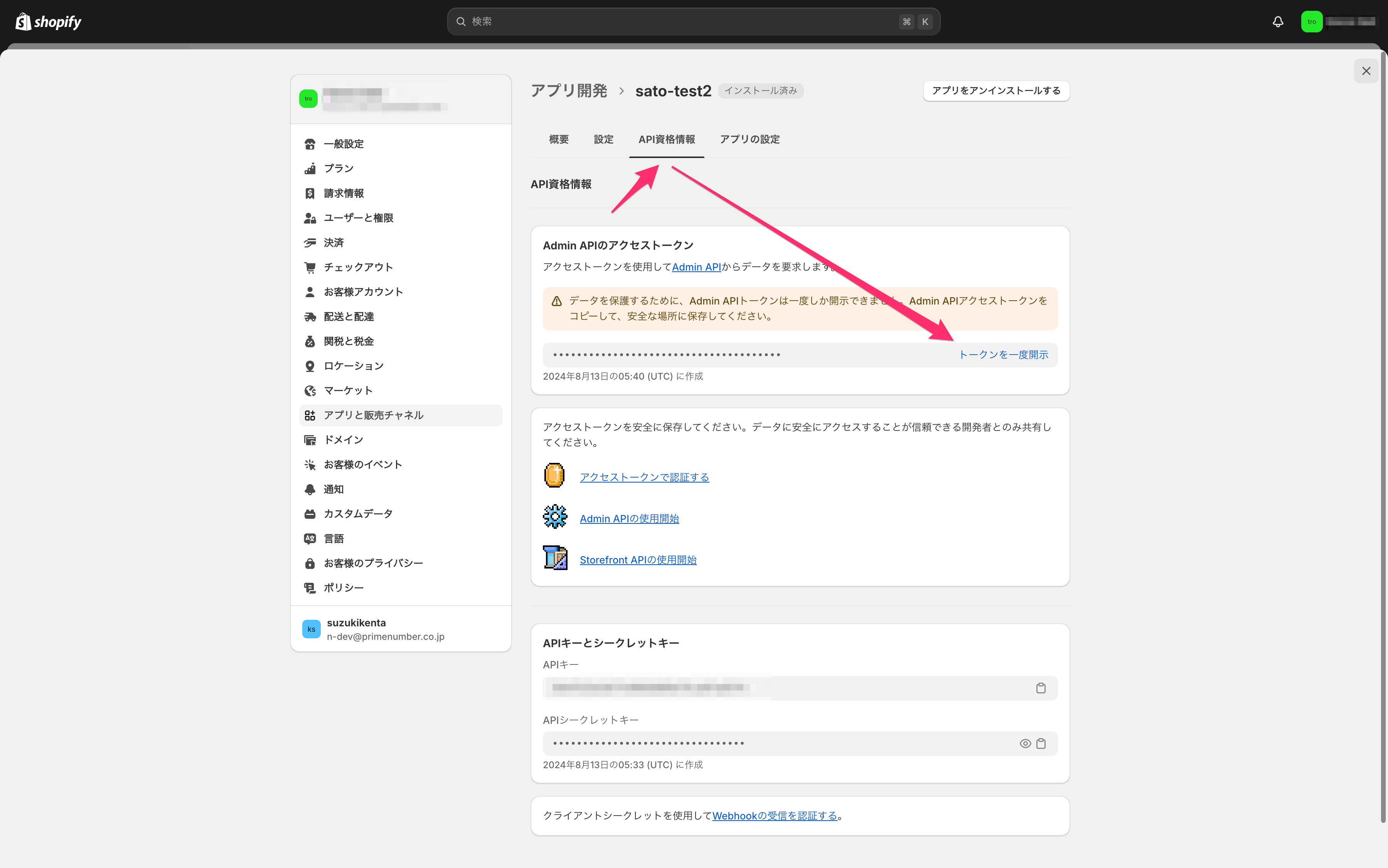
Admin APIのアクセストークンをメモします。
スコープの付与
ターゲットごとに必要となるスコープは異なります。
| 取得対象 | 必要となるスコープ | 補足 |
|---|---|---|
abandoned_checkouts |
read_orders |
|
collections |
read_products, read_publications, read_product_listings |
|
customers |
read_customers, read_orders |
|
disputes |
read_shopify_payments_disputes |
|
draft_orders |
read_draft_orders, read_payment_terms, read_customers, read_orders |
|
fulfillment_line_items |
read_orders |
|
fulfillment_orders |
read_assigned_fulfillment_orders |
|
fulfillments |
read_orders |
|
inventory_item_country_harmonized_system_codes |
read_inventory |
|
inventory_items |
read_inventory, read_products |
|
locations |
read_locations |
|
metafields |
read_orders, read_products, read_customers |
|
order_agreements |
read_orders |
|
order_line_items |
read_orders, read_products |
|
order_refunds |
read_orders |
|
order_risks |
read_orders |
|
order_transactions |
read_orders |
|
orders |
read_orders, read_customers, read_locations, read_marketing_events, read_payment_terms, read_shopify_payments_accounts |
StaffMemberのidを取得データに含める場合は、以下の条件を両方満たす必要があります。
|
product_variants |
read_products, read_shipping, read_locations |
|
products |
read_products, read_publications, read_product_listings |
|
refund_line_items |
read_orders |
すべてのスコープ
すべてのスコープを付与したい場合は、下記からコピーしてご利用ください。
read_assigned_fulfillment_orders,read_customers,read_draft_orders,read_inventory,read_locations,read_orders,read_marketing_events,read_payment_terms,read_product_listings,read_products,read_publications,read_shipping,read_shopify_payments_accounts,read_shopify_payments_disputes
TROCCO側の設定項目
| 項目名 | 必須 | 内容 |
|---|---|---|
| 名前 | ✓ | TROCCO内部で利用する接続情報の名前を入力します。 |
| メモ | - | TROCCO内部で利用する接続情報のメモを入力できます。 |
| ドメイン | ✓ | Shopifyのドメイン名を入力します。 |
| 認証タイプ | ✓ | 認証タイプを選択します。
|
| クライアント ID | ✓ | 認証方式にOAuth 2.0 Client Credentialsを選択した場合に表示されます。Dev Dashboardで取得したClient IDを入力します。 |
| クライアントシークレット | ✓ | 認証方式にOAuth 2.0 Client Credentialsを選択した場合に表示されます。Dev Dashboardで取得したClient secretを入力します。 |
| アクセストークン | ✓ | 認証方式にAdmin API アクセストークンを選択した場合に表示されます。Shopify管理画面で取得したAdmin APIのアクセストークンを入力します。 |